Weather Radar & Weather Live
- 3.9
- Rating
- 5.00M
- Installs
- Free
- Price
 Analysis by App-foxy
Weather Radar & Weather Live is the kind of weather app I reach for when a simple temperature number is not enough. I want to know whether rain is moving toward me, whether snow may affect a journey, or whether strong sunlight changes the way I plan an afternoon. That practical focus makes it more useful than a basic forecast widget in some situations, although the experience depends heavily on having a reliable connection when I need current radar information.
Developed by Avn Global Application, this free weather app is available for everyone and runs on Android devices using version 7.0 or later. It has reached more than a million installs and holds a 4.1 average from roughly twenty thousand ratings, which suggests that it has found a sizeable audience without making it the right choice for every weather habit.
How Weather Radar & Weather Live works when the connection matters
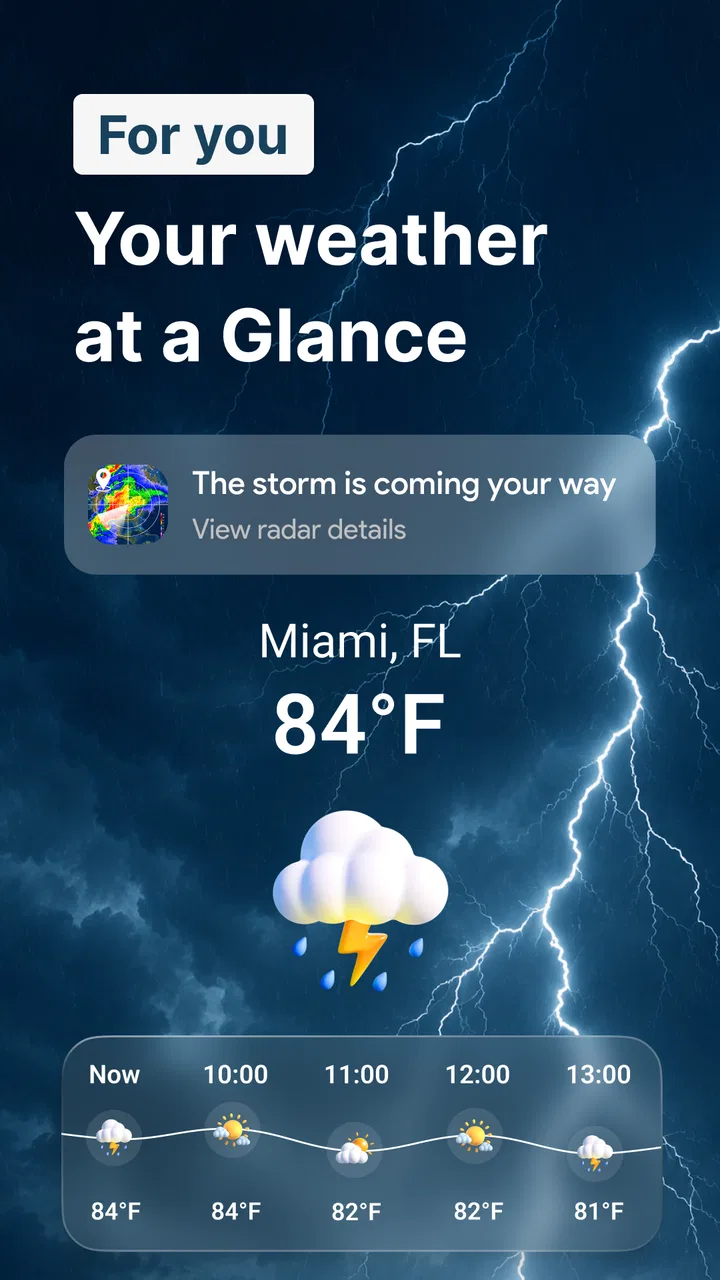
The main appeal is the radar-oriented approach. Instead of treating weather as a single daily sentence, I can use the app to look at a changing situation, especially rain. That distinction matters when I am deciding whether to leave now, wait fifteen minutes, carry waterproof clothing, or move an outdoor plan indoors. A conventional weather app may tell me that rain is expected, but a radar view can make the timing feel more tangible.
You May Also Like

 Blood Strike: 2.5 Anniversary
Blood Strike’s Loadouts Turn Every Drop Into a Tactical Gamble
A close look at Blood Strike’s custom loadouts: how fast access to signature weapons reshapes its battle royale rhythm, rewards preparation, and narrows the gap between fights.

 Pandora - Music & Podcasts
Pandora’s Music Is Easy to Start, but Harder to Recover
Pandora’s strength is its low-effort path from a seed to a station. Its weak spot is how much confidence it asks you to place in connection, setup, and quiet recovery.

 8 Ball Pool
 Is Built on Rivalries, Rematches, and Routine
A close look at the rivalries, rematches, shared routines, and unanswered safety questions that turn a quick pool match into a persistent mobile community.

 Samsung Music
’s Quiet Strength Is Playing What You Already Own
Its reach comes less from spectacle than from dependable access to a personal library. That simplicity is both the app’s strongest retention engine and its ceiling.

 AccuWeather: Weather Radar
AccuWeather Review: A Quick, Clear Forecast for Everyday Decisions
For everyday plans, the best forecast is the one you can understand quickly. AccuWeather makes rain timing, radar, and local conditions easy to act on, with a few trade-offs.

 Hill Climb Racing
Why Hill Climb Racing Still Turns Crashes Into One More Run
A tiny car, a bumpy hill and one more upgrade: Hill Climb Racing keeps resurfacing because its simple chaos makes every near-miss feel personal.
More From Our News Desk



The app’s store summary also points to UV information and snow reports. Those are useful because they answer different planning questions. Rain radar helps with immediate movement, UV information helps with exposure during a bright day, and snow conditions are more relevant to travel, walking, and winter activities. I like that combination because it keeps the app from being useful only when clouds are already visible.
In my experience, the best way to use a radar-focused weather app is not to stare at it continuously. I check it before leaving, then again when conditions seem to be changing. The value comes from comparing what I see outside with the latest information rather than assuming that one forecast will remain perfect throughout the day.
Why live radar is more demanding than a static forecast
A radar screen is naturally more dependent on fresh network data than a basic weather icon. When the connection is good, the app feels responsive as a planning tool: I can open it, inspect the current weather picture, and make a decision based on what is approaching. When the connection is weak, the experience becomes less reassuring because weather movement is exactly the kind of information that loses value as it becomes old.
This is an important trade-off. A standard phone weather panel may be quicker for checking the current temperature, particularly if it has already cached a summary. Weather Radar & Weather Live makes more sense when I need visual context and several weather angles in one place. I would not use it as my only source during a serious journey if I could not reliably refresh the information.
There is also a practical habit worth adopting: open the app while you still have a dependable connection, not only after arriving somewhere with poor reception. Checking a route or outdoor plan before leaving gives the radar information a chance to load at the moment it is most useful. That small change prevents a common frustration—waiting for a weather screen to become meaningful precisely when the signal is weakest.
Using it during ordinary mobile situations
The app fits naturally into short, interrupted checks. I can imagine opening it while standing near a train station, before walking to work, or while deciding whether a child’s outdoor activity should go ahead. These are not long browsing sessions. They are quick decisions where a visual indication of rain may be more helpful than reading several lines of forecast text.
For commuting, I would use the radar first and the broader weather information second. If rain is visibly developing along the direction I need to travel, I may choose a different departure time or pack a coat. If the radar looks quiet but the UV index is high, the decision changes: shade, water, and sun protection become more relevant than an umbrella. This is where the app’s mix of weather details feels more useful than a single-purpose rain alert.
On a trip, I would check the app at key transition points rather than constantly refreshing it. Before leaving a hotel, before starting a walk, and before returning from an outdoor location are sensible moments. This reduces unnecessary screen time and makes the connection requirement easier to manage because I am asking the app for information at deliberate points.
One less obvious benefit of this workflow is that it helps separate immediate weather from general planning. Radar is most valuable for what may happen soon, while snow information and UV readings can influence a longer outing. Treating every panel as if it answered the same question would make the app feel confusing; using each one for its proper decision makes it more efficient.
What happens when loading fails or information feels stale
Any live weather tool needs a sensible recovery routine. If the radar does not load, my first step would be to avoid making a precise rain decision from an incomplete screen. I would retry once after moving to a stronger signal or switching from a crowded public connection to mobile data. If the app still cannot refresh, I would treat the last visible information as uncertain rather than assuming it represents current conditions.
This is not a criticism unique to this app, but it matters more here because its identity is built around live weather awareness. A static forecast can remain moderately useful when it is a little old; a moving rain picture is much less dependable if the update has been interrupted. The app is therefore strongest for users who can usually connect when they check it.
Recovery is also easier when I avoid opening the app for the first time at the exact moment a decision becomes urgent. For example, checking before leaving home gives me a reference point. If I later lose reception, I at least know what the situation looked like earlier, even though I would not mistake that earlier view for a guarantee.
I would also keep expectations realistic about prediction. Radar can show a useful direction of travel, but weather does not always behave neatly around a neighborhood, a hill, or a coastline. A narrow rain band may change quickly. The app helps me make a better-informed choice; it does not remove uncertainty. That distinction is especially important when planning something expensive, time-sensitive, or difficult to cancel.
Making weather checks less wasteful on mobile data
Because the most valuable parts of the app are visual and current, I would use it deliberately on a limited data plan. I would avoid repeatedly reopening the radar just to watch small changes. One check before departure and another when conditions genuinely change is usually more sensible than constant refreshing. This is both kinder to data usage and easier on battery life, even without turning the app into a background monitoring service.
Wi-Fi is convenient for longer planning sessions, such as examining the weather before a day trip. Mobile data is more appropriate for a quick check while moving. The useful compromise is to do broad planning at home and reserve on-the-go checks for decisions that have changed. That approach also reduces the chance of becoming dependent on a weather screen that may not refresh properly in a weak-signal area.
The free starting point is appealing, but the app includes in-app purchases ranging from $1.99 to $94.99 per item. I would examine any purchase screen carefully before confirming anything and decide whether an upgraded experience actually solves a problem I have. Someone who only needs occasional rain checks may find the free access sufficient, while a frequent weather watcher may consider extra paid options more relevant. The price range makes it especially important not to assume that every useful-looking function is included without cost.
My data-conscious routine would be simple: check the radar on a stable connection, note the practical conclusion, then close the app rather than leaving it open for reassurance. Weather information is helpful when it changes a decision. It becomes less helpful when repeated checking adds no new information.
Where it beats familiar weather alternatives
Compared with the default weather screen on a phone, Weather Radar & Weather Live offers a more active way to think about rain. A standard widget is excellent for speed: glance at it and see a temperature or general condition. This app is better when I need to understand whether a wet period is approaching and how that affects a specific plan.
Compared with a highly detailed professional weather service, it may appeal more to ordinary users who want several practical signals without turning every check into a technical exercise. The combination of radar, UV information, and snow reporting gives it a broad everyday role. On the other hand, someone who needs specialist forecasting, extensive historical tools, or highly technical atmospheric analysis may prefer a dedicated service designed around that depth.
It also differs from relying on a general web search. Searching for weather can be quick, but it often produces a single answer for a location and moment. A dedicated interface encourages me to inspect the situation rather than accept one sentence. That is useful when the weather is unsettled, although it requires a little more attention than reading a simple icon.
The most important comparison is not “which app has the biggest list of features?” but “what decision am I trying to make?” For a quick temperature check, the phone’s built-in option may be enough. For deciding whether to walk across town before rain arrives, this app’s radar focus is more persuasive. For demanding travel planning, I would combine it with another trusted source instead of treating it as the sole authority.
Who will get the most from it
I think the app is a good fit for commuters, walkers, parents organizing outdoor time, travelers, and anyone whose plans are regularly affected by changing rain. It is also useful for people who want UV and snow information alongside rain awareness rather than installing separate tools for every concern.
A realistic example is a Saturday market visit. Before leaving, I check the radar over a stable connection and see whether rain appears to be moving toward the area. I then look at the UV information because a break in the clouds could still make the afternoon uncomfortable. If the weather is cold or the route includes higher ground, the snow report may influence footwear and timing. The app does not make the decision for me, but it puts the relevant questions in one place.
It is less suitable for someone who wants a completely passive experience. If I only want a tiny widget, a voice answer, or a forecast that never asks me to inspect a map-like view, a simpler alternative may feel faster. It is also not my first recommendation for anyone who expects live information to remain equally useful without a dependable connection.
Users who are sensitive to optional spending should pay attention to the in-app purchase structure. The app itself is free, which makes trying it low-risk, but the presence of paid items means I would not tap through upgrade prompts casually. The right choice depends on whether the added value matches the way I actually use weather information.
Everyday strengths, friction, and sensible habits
The strongest part of the experience is the shift from passive forecasting to practical timing. Rain radar gives me a reason to open the app when a normal forecast feels too vague. UV and snow information broaden its usefulness, while the free entry point makes it easy to test against my own routine.
The main friction is the same feature that creates its appeal: current, visual weather information needs current connectivity. A slow refresh can undermine confidence, and no radar view should be treated as an absolute promise about what will happen at street level. I also prefer not to depend on repeated live checks when traveling through areas where reception is unpredictable.
My best tip is to build a two-stage habit. First, check the broader situation before leaving home. Second, use the app on the move only when the sky, route, or schedule changes. This makes the service more useful than a constant stream of updates and gives me a clearer idea of whether a new check is genuinely necessary.
Another useful habit is to read the radar together with the real world. Darkening clouds, wind direction, and visible conditions can tell me whether the displayed situation still makes sense. If the app and the sky disagree, I would choose caution rather than forcing one source to be correct. Weather apps support judgement; they should not replace it.
My final view on Weather Radar & Weather Live
Weather Radar & Weather Live is most convincing as a connected decision-making tool, not merely a replacement for a temperature widget. I like it for checking rain movement before a walk, using UV information to shape a daytime plan, and consulting snow reports when winter conditions matter. Its free availability, Everyone rating, and support for older Android devices make it approachable, while its current version, 2.4.8, shows that the app remains actively presented as a maintained option.
At the same time, I would keep a backup habit for poor-signal situations and avoid treating a refreshed radar image as a guarantee. The app works best when I can connect at the moments that matter and when I use the information to answer a specific question. If you want a richer view of changing rain than a standard phone forecast provides, I think it is worth trying. If you want the smallest possible weather glance or need specialist forecasting for critical travel, another option may suit you better.
Overall, I would recommend Weather Radar & Weather Live to anyone who regularly makes outdoor plans around uncertain weather. Its real strength is not simply showing more information; it is helping me decide when to leave, what to carry, and whether a plan needs changing. That value is clearest with a stable connection, a short checking routine, and realistic expectations about the limits of any live forecast.
FAQs for Weather Radar & Weather Live
01What features does Weather Radar & Weather Live offer?
Weather Radar & Weather Live provides real-time weather updates, including current conditions, hourly forecasts, and a 7-day outlook. It features an interactive radar map, severe weather alerts, and customizable weather widgets. The app also offers detailed information on wind speed, humidity, and temperature trends.
02Is Weather Radar & Weather Live free to use?
The app offers a free version with basic features, including real-time weather updates and radar maps. However, for an ad-free experience and access to premium features like advanced alerts and detailed forecasts, users can opt for a subscription model. Pricing details are available within the app.
03How accurate is the weather information provided by the app?
Weather Radar & Weather Live sources data from reliable meteorological agencies, ensuring high accuracy. The app uses advanced algorithms to provide precise forecasts and real-time updates. However, as with all weather apps, slight variations can occur due to the ever-changing nature of weather conditions.
04Can I customize notifications in Weather Radar & Weather Live?
Yes, the app allows users to customize notifications to suit their preferences. You can set alerts for specific weather conditions, such as severe storms or temperature changes. Additionally, users can choose the frequency of updates and select which notifications appear on their home screen.
05Does Weather Radar & Weather Live support multiple locations?
The app supports tracking weather for multiple locations, making it ideal for users who travel frequently or want to monitor weather conditions in different areas. You can add and switch between various locations easily within the app, ensuring you stay informed wherever you are.
Pros
- Accurate and real-time weather updates.
- Customizable alerts for severe weather.
- User-friendly interface with sleek design.
- Detailed radar maps with animations.
- Supports multiple locations for tracking.
Cons
- Frequent ads can be distracting.
- Some features require in-app purchases.
- High battery usage on prolonged use.
- Occasional inaccuracies in smaller areas.
- Requires stable internet for updates.

Weather Radar & Weather Live
Gallery